
The popular advice is to ask AI to write your entire resume, paste the result into a template, and move on. That workflow saves time at the first draft and creates risk everywhere after it. Using AI to write a Markdown resume works better when AI edits a canonical source you control, because the cost is clear: you give up the convenience of one-click authorship and take responsibility for every fact, date, keyword, and export.
In Resumey.Pro work, the failures are predictable. AI drafts have produced inflated titles, unsupported achievements, hallucinated employment dates, contact fields whose line breaks disappear, and PDFs that look correct but fail a copy-paste parse check. Markdown gives you a clean, diffable source file. AI should operate on top of it as a revision layer, not replace it.
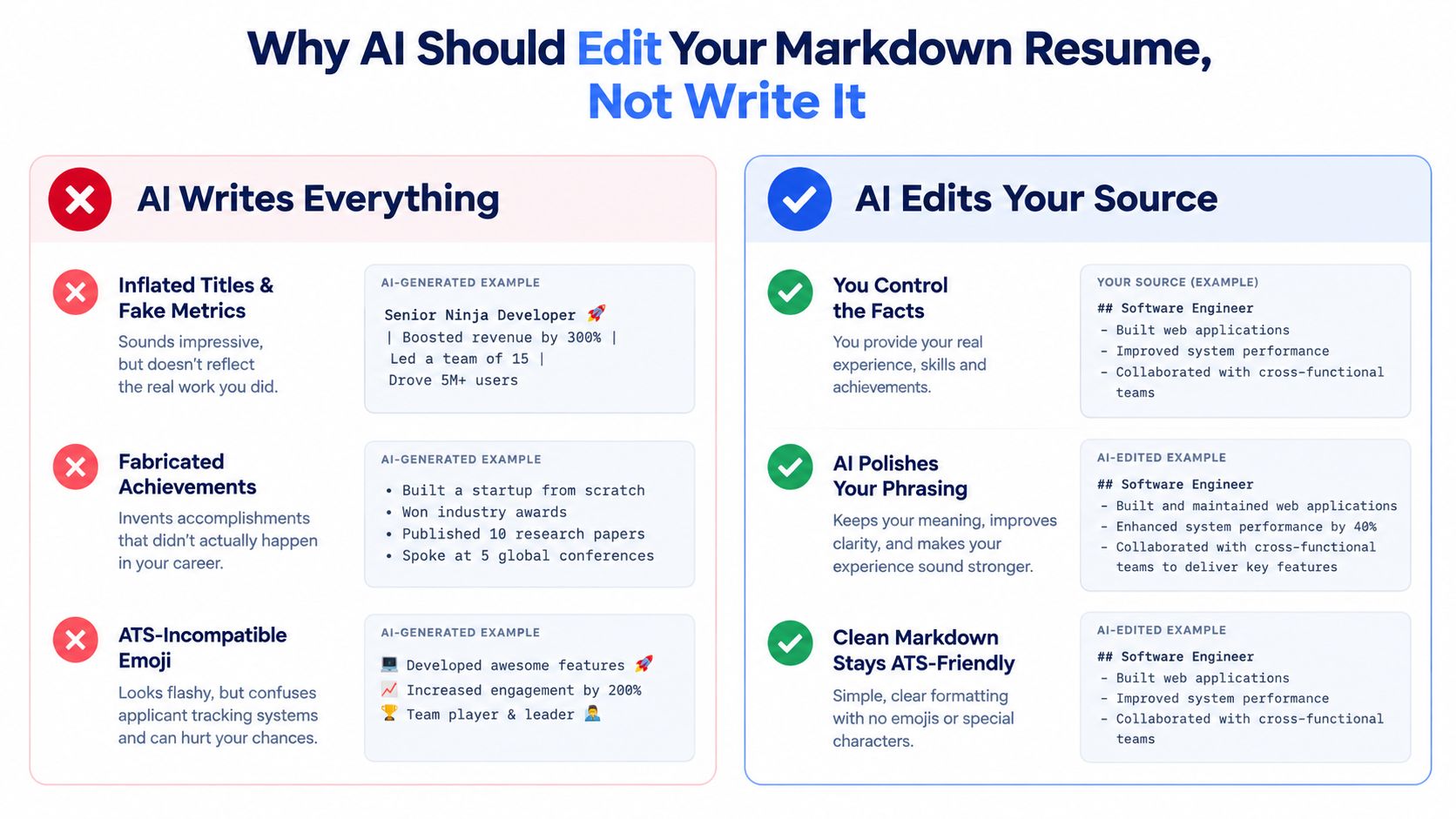
Why AI Should Edit Your Markdown Resume, Not Write It
A whole-resume prompt asks a language model to make decisions it can't verify. It doesn't know whether a project reduced deployment time, whether a job began in a particular month, or whether “platform architect” accurately describes an official title. When the prompt leaves gaps, the model tends to fill them with polished language. That polish can hide unsupported claims.
The safer argument is narrower and more useful. Keep one Markdown file as the version of truth, then use AI to improve clarity, tailor language, identify weak verbs, and expose missing evidence. You can inspect every change, compare revisions, and reject anything that changes the facts.
The failure modes are operational
Three problems show up repeatedly after export:
- Dates become fiction. A model may turn an incomplete employment period into a complete date range or move a role into the wrong year.
- Contact fields merge. A renderer or AI edit can collapse email, phone, location, and profile links into one line, making extraction ambiguous.
- Visual review hides text failure. A PDF can look polished while copied text arrives out of order, drops characters, or loses an entire section.
Applicant tracking systems make this a parsing problem, not only a design problem. A 2026 ATS audit reported detectable ATS use on 97.8% of Fortune 500 career sites, with industry benchmarks commonly placing the figure at 98–99%. The same source reports that roughly 75% of resumes are rejected before human review, so preserving machine-readable structure matters before visual styling.
The workflow is simple:
- Source: maintain the canonical Markdown and verify facts.
- Revise: ask AI for controlled edits against that source.
- Validate: inspect the rendered PDF and DOCX as extracted plain text.
The tradeoff is worth stating plainly. AI won't be allowed to invent a missing metric or reorganize the document for you. In exchange, each version remains understandable, reviewable, and recoverable.
A randomized controlled trial involving 480,948 jobseekers found that algorithmic resume assistance improving spelling and grammar increased the probability of being hired by 7.8%, according to MIT Sloan's coverage of the trial. The result supports assisted editing, not blind authorship. Use AI to refine language, then review role fit, specificity, dates, and claims yourself.
Building the Canonical Markdown Source
Start with a source file that contains facts before style. The structure should be boring by design. Standard headings, predictable dates, plain bullets, and one contact field per line give both AI and downstream parsers fewer ways to misinterpret the document.
A practical order for a technical resume is:
- Contact: name, email, phone, location, LinkedIn, and GitHub.
- Summary: a concise positioning statement.
- Experience: reverse-chronological employment.
- Projects: selected technical work with evidence.
- Skills: grouped tools and technologies.
- Education: degree, institution, and dates.
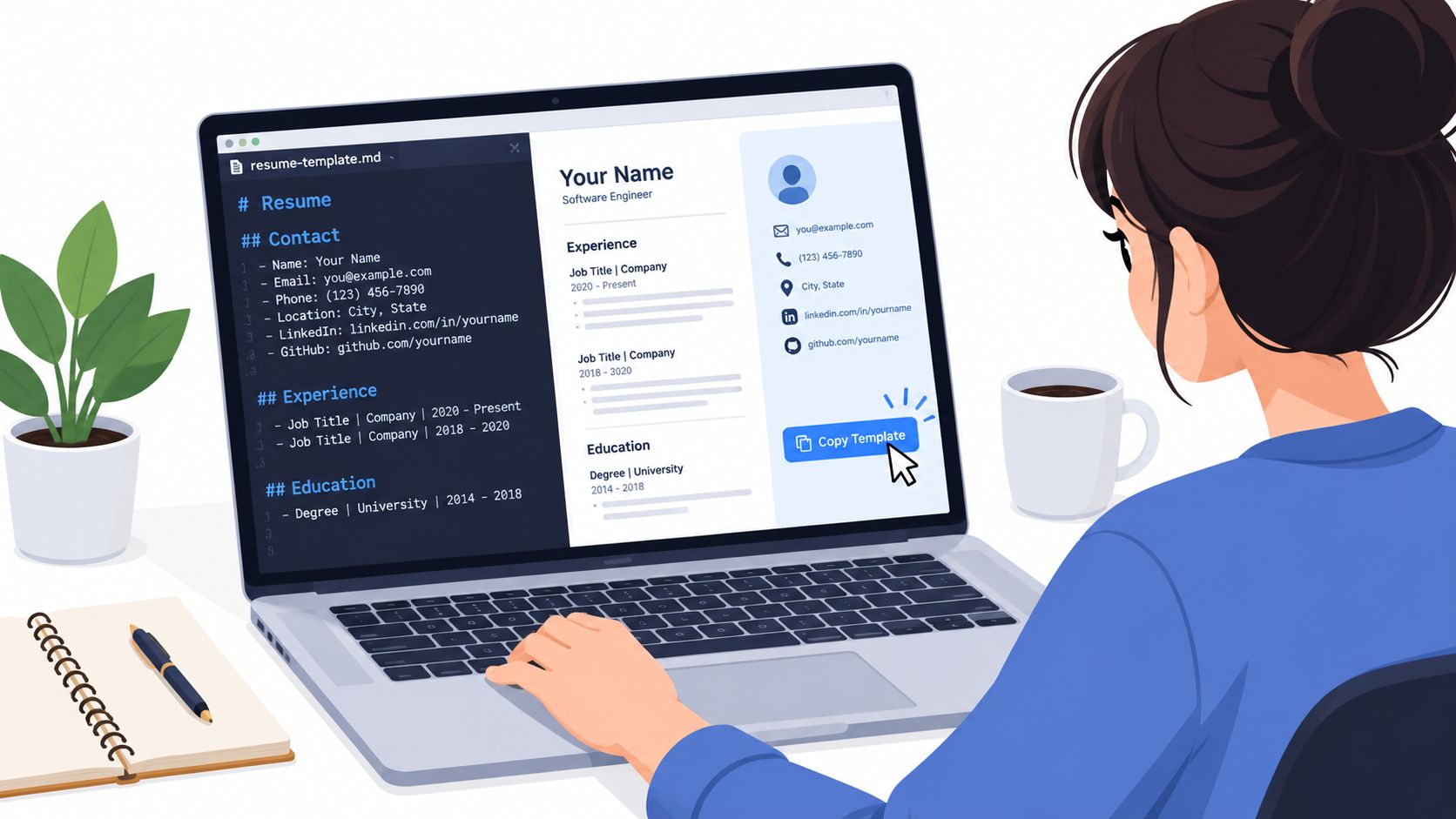
Keep dates consistent. Mon YYYY is a useful format, such as Jan 2023 to Present or Jun 2020 to Dec 2022. For a current role, leave the end date represented as Present rather than asking AI to infer it. Use official job titles, and put an explanatory clarification in the summary or bullet content only when it improves accuracy.
A minimal source can look like this:
---
name: Jordan Lee
email: jordan.lee@example.com
phone: +1 555 010 2040
location: Austin, TX
linkedin:
github:

---

## Summary

Backend engineer building reliable services with Go, Python, PostgreSQL, and AWS.

## Experience

### Backend Engineer, Northstar Systems

Jan 2023 to Present

- Designed Go services for internal deployment workflows.
- Reworked PostgreSQL queries used by billing and reporting systems.
- Documented incident response procedures for the platform team.

### Software Engineer, Cedar Labs

Jun 2020 to Dec 2022

- Built Python APIs used by customer-facing applications.
- Added automated tests around authentication and data access.
- Partnered with operations engineers on production troubleshooting.

## Projects

### Deployment Control Plane

- Built a Go service that coordinates application release jobs.
- Added audit logging and rollback documentation.

## Skills

Go, Python, PostgreSQL, AWS, Docker, Kubernetes, Git

## Education

BSc Computer Science, State University, May 2020
Two details that prevent quiet breakage
The parser reads the front matter as the contact header, so keep each field on its own line and preserve the key names expected by the importer. A table may look compact in Markdown, but pipes and alignment markers can become literal content or disrupt extraction.
Nested bullets are another common trap. A line such as - detail may render as a sub-bullet, collapse into the previous line, or change reading order after export. Keep achievement bullets flat unless the template and export path have been tested with that nesting.
Resumey.Pro supports Markdown editing and live rendering, so the source remains separate from the visual template. That separation lets you change design without rewriting the content, provided the structural syntax stays stable.
The video below shows the source-to-render workflow in context.
Prompt Templates That Actually Improve the Draft
Good prompts constrain the edit. They identify the source, define what may change, and tell the model what it must never invent. Paste only the relevant section when possible, then compare the response against the canonical file.
Clarity pass for weak bullets
Rewrite the five resume bullets below for a backend engineer role.

Return ten alternatives total, with two alternatives for each original bullet.
Keep every fact, tool, date, and outcome unchanged.
Do not invent metrics, users, revenue, scale, or responsibilities.
Start each bullet with a specific action verb.
Use plain Markdown bullets only.

Source bullets:
[PASTE FIVE BULLETS]
Target role:
[PASTE ROLE TITLE]
Verify that every version still describes work you performed. Reject any alternative that adds implied scale or changes ownership.
Quantification pass without fabricated evidence
Review these resume bullets and identify where a real metric would make the result more specific.
Do not create a number.
For each suggested metric, insert a placeholder such as [X]%, [N] services, or [TIME PERIOD].
If no honest metric is available, suggest a qualitative evidence phrase instead.
Return the original bullet, the proposed revision, and the fact I must verify.

Bullets:
[PASTE BULLETS]
The brackets are a safeguard. Replace them only with a number from your records, or remove the placeholder before export.
Job-description alignment pass
Compare my canonical Markdown resume with the job description below.

Preserve all headings, front matter keys, section order, dates, employers, and official titles.
Return a diff-style list under these labels:
ADD, REWRITE, REMOVE, VERIFY.

Identify missing role terminology, weak verbs, irrelevant projects, and skills that are present in the source but buried.
Use the job description's language only when it accurately describes my experience.
Do not add a tool, responsibility, or achievement that isn't in the source.

Canonical Markdown:
[PASTE RELEVANT SOURCE]

Job description:
[PASTE JOB DESCRIPTION]
This is the right place to use AI for keyword targeting. It can expose a mismatch between “release automation” in the posting and “deployment workflow” in the source, but you still decide whether the terms describe the same work.
Tone and condensation pass
Condense this summary to exactly two sentences.
Keep the strongest keyword for the target role: [KEYWORD].
Preserve my actual experience and technical scope.
Remove generic adjectives, unsupported claims, and repeated tools.
Return three alternatives in Markdown, with no heading.

Summary:
[PASTE SUMMARY]
Check that the keyword appears naturally and that the summary hasn't become a list of technologies.
For a hands-on walkthrough of this workflow, see how to make a Markdown resume with ChatGPT. Two habits need a hard stop: don't let AI rename standard headers with synonyms, and don't let it reorder sections. “Professional History” may sound refined, but “Work Experience” is more predictable. Section order also helps humans and parsers establish context.
Tailoring One Resume Into Role-Specific Versions
A canonical file should generate variants, not replacements. Pick three target postings that represent the roles you're pursuing, then compare each posting with the same source. The comparison should identify missing evidence, language that needs tightening, and content that distracts from the role.
For a backend engineer moving toward platform engineering, the source might begin like this:
## Summary

Backend engineer building APIs and data services with Go, Python, PostgreSQL, and AWS.

## Skills

Go, Python, PostgreSQL, AWS, Docker, Kubernetes, Git
A platform-focused variant can preserve the structure while changing the emphasis:
## Summary

Platform-minded backend engineer building deployment services and internal tooling with Go, AWS, Docker, Kubernetes, and PostgreSQL.

## Skills

AWS, Kubernetes, Docker, Go, Terraform, PostgreSQL, Python, Git
The experience bullets should change only where the source contains support. For example:
- Built Python APIs used by customer-facing applications.
- Partnered with operations engineers on production troubleshooting.
can become:
- Built Python APIs and deployment integrations for customer-facing applications.
- Partnered with operations engineers on production troubleshooting and release support.
The second version emphasizes platform relevance, but it doesn't claim ownership of infrastructure that the source never established. That distinction matters more than keyword density.
| Editing Action | ATS Risk | Recommendation |
|---|---|---|
| Rewrite the summary | Low when headings remain unchanged | Tailor the target role, tools, and scope without adding claims |
| Reorder skills within the same section | Low | Put role-critical skills first, and keep exact tool names |
| Rename headings | Medium | Keep standard labels such as Summary, Experience, Skills, and Education |
| Add a project from the source | Low | Include it when it supports the posting, and retain its original facts |
| Change front matter keys or YAML | High | Leave the importer fields untouched |
Use a constrained prompt for each fork:
Create a role-specific variant from this canonical Markdown resume.

Preserve the YAML block, all front matter keys, heading hierarchy, section order, employer names, official titles, and dates.
Rewrite only the Summary and the top four Experience entries.
Reorder the Skills list to reflect the job description, but don't add skills absent from the source.
Suggest project changes separately under ADD, KEEP, and DROP.
Return valid Markdown and a short change log.

Target role:
[ROLE TITLE]

Job description:
[PASTE JOB DESCRIPTION]

Canonical source:
[PASTE SOURCE]
Save each result as a separate file with a descriptive role slug. Never let the model alter YAML keys. Resumey.Pro's importer relies on those fields, and a visually valid document can still lose contact data when the source metadata changes.
Exporting Through Resumey.Pro and Validating the Result
Paste the canonical Markdown into the Resumey.Pro editor, then inspect the live render. Confirm that the front matter appears in the contact header, section headings are distinct, links remain selectable, and dates stay attached to the right roles. The editor's purpose is to render controlled text into a resume layout, not to conceal source problems.
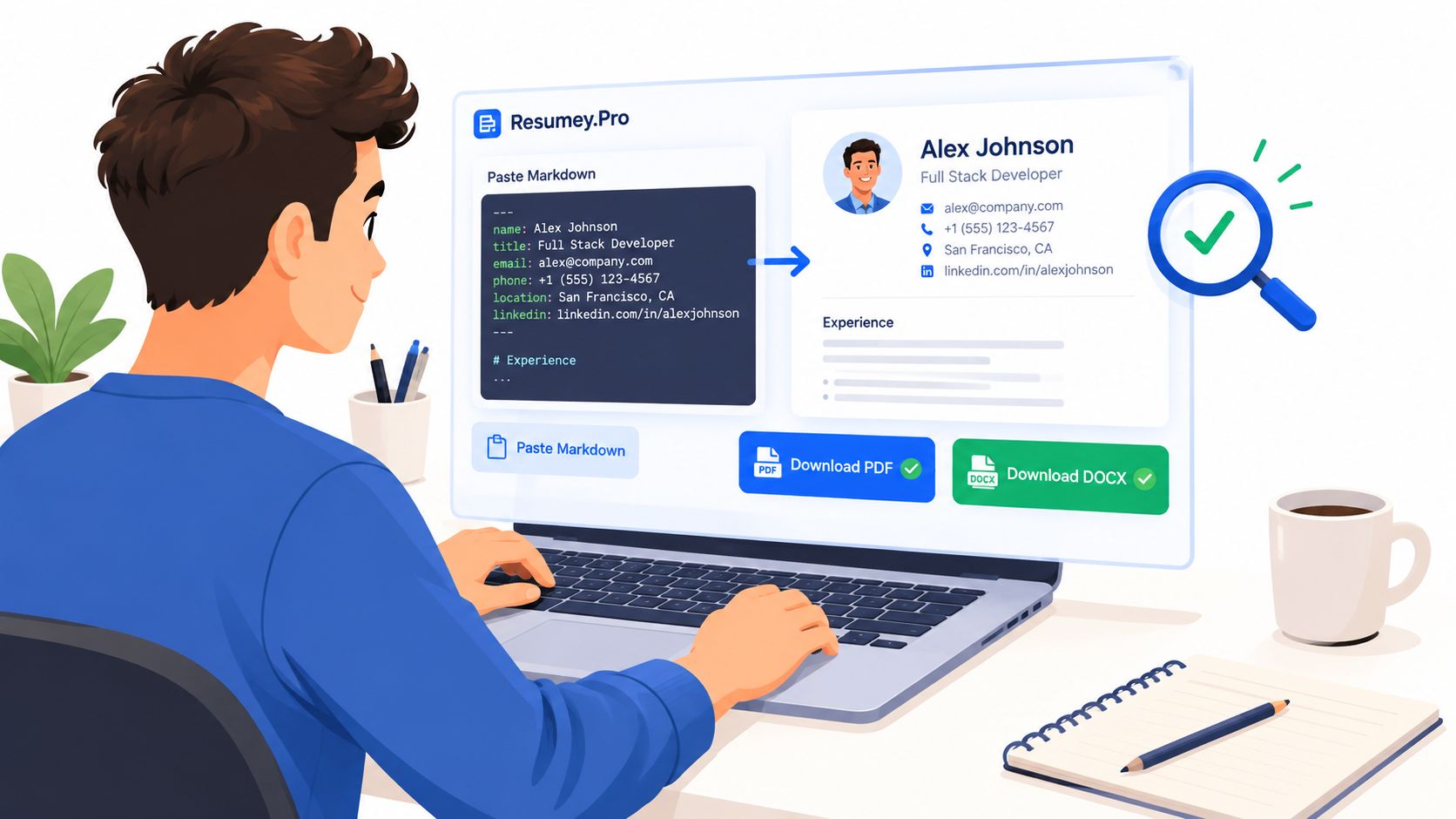
Download both PDF and DOCX when the application accepts either format. PDF is accepted by 96% of ATS systems, while DOCX is accepted by 100%, according to ATS format guidance from CV Craft. Those figures describe format acceptance, not a guarantee that your particular export will parse correctly.
The copy-paste check
Open the exported file, select all text, and paste it into a plain-text editor. Review the result in this order:
- Contact details appear separately and in the intended order.
- Summary, Experience, Projects, Skills, and Education headings survive.
- Employer names, titles, and dates remain associated.
- Bullets retain their order and don't merge.
- Links and special characters remain readable.
Independent ATS guidance recommends this test because a PDF's visual preview can hide a broken text layer. A Markdown CV generator can create the rendered document, but validation still belongs to the person submitting it.
Watch for nested bullets collapsing into the preceding line, Unicode dashes becoming question marks in older Word builds, missing links, and table pipes appearing as raw characters. Skill chips can also disappear when a label drops below a 4-character threshold, so write short skills in a form the template preserves.
AI watermarks or visible generation artifacts are a separate cleanup concern from ATS parsing. For a focused explanation of what an AI watermark remover can remove, use a tool that explains its limits and keeps the resume text intact.
For a quick comparison of two extracted files, run:
diff -u role-backend.txt role-platform.txt
Compare exported text, not screenshots. A layout can appear unchanged while the reading order has regressed.
Submit-Ready Checklist and What to Do Next
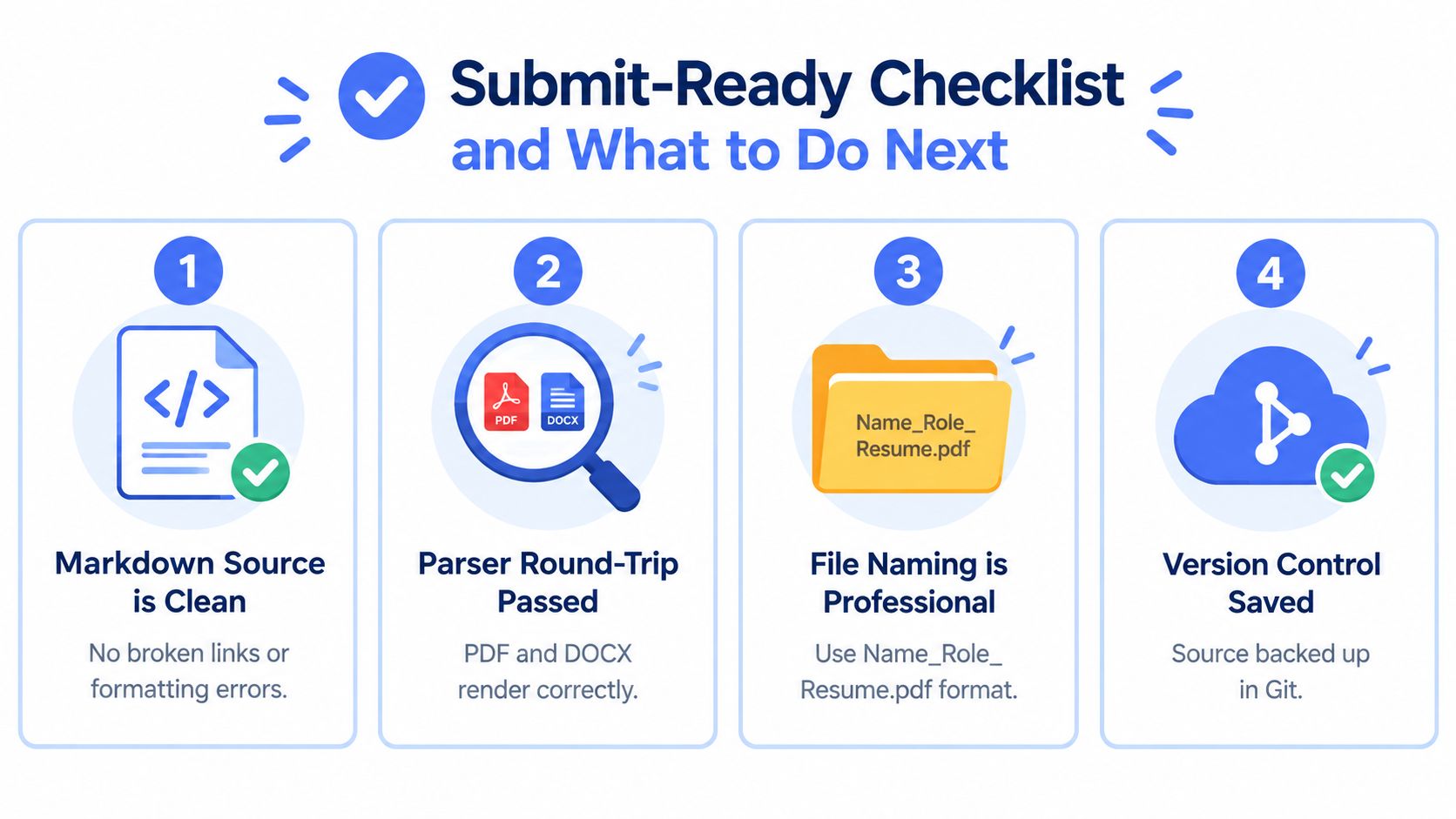
Treat submission as four fast passes. Each pass checks a different layer of the workflow.
- Markdown source is clean: Open the canonical file and confirm front matter, headings, dates, links, and flat bullets. The structure should match the source you intend to maintain.
- Parser round-trip passed: Copy text from the PDF and DOCX into a plain-text editor. Check contact details, section order, dates, and bullet boundaries.
- File naming is professional: Use a clear pattern such as
Name_Role_Resume.pdf, then confirm the filename matches the target posting. - Version control is saved: Store the canonical file and each specific variant with descriptive slugs. A Git commit or another backup gives you a recoverable record of the submitted version.
The broader platform workflow also benefits from keeping technical claims precise and reviewable. For adjacent reading on platform engineering, the platform engineering AI blog offers context that can help you describe infrastructure work without turning broad responsibilities into unsupported resume claims.
Next, clone the canonical source into a new role-specific variant and run the validation pass before sending it. Then convert the same Markdown content into a StoryCV at StoryCV for recruiter outreach, where a concise narrative can complement the ATS-oriented document. Your canonical file is the long-term asset. Every application should be a controlled fork, not a rewrite from scratch.
Resumey.Pro gives you a Markdown editor, live rendering, ATS-oriented templates, cloning for role-specific versions, and PDF or DOCX export so AI edits stay attached to a source you can inspect. Visit Resumey.Pro, create the canonical resume, clone it for the target role, and run the copy-paste validation before you submit.