
The popular advice says a resume needs visual polish to stand out. For software, data, DevOps, and IT roles, I take the opposite position: a simple Markdown resume is usually a better foundation than a heavily designed document because it preserves the structure hiring software can read, while making role-specific tailoring fast. The cost is real. You give up columns, graphics, decorative sidebars, and some visual flair. In return, you get a linear document that's easier to parse, revise, clone, and export. That trade-off matters because nearly 98% of Fortune 500 companies use a detectable ATS to screen resumes before a recruiter sees them, according to JobLeads' ATS-friendly resume guidance.
Why a Simple Markdown Resume Wins Interviews
A resume can look polished in a browser and still fail during ATS extraction. Tables may place fields out of order. Sidebars can appear after the main content or disappear. Icons and graphics may help a recruiter scan visually, but they offer little when software is searching for text, headings, dates, employers, and skills.
Markdown makes a deliberate trade-off. Its basic syntax produces a predictable hierarchy: headings identify sections, bullets separate achievements, and plain text remains selectable. That structure supports single-column layouts, standard headings, and measurable accomplishments. You lose some visual flair, but the file becomes easier to edit, export, and move between hiring platforms. For a direct comparison of parsing behavior, see why Markdown beats Word for resumes.
Document structure is a practical failure point. A 2026 ATS resume study covering 2,417 anonymized scans reported formatting issues in 62% of submitted resumes, an average job-specific match score of 58/100, and incorrect parsing by enterprise ATS platforms for nearly 1 in 4 resumes. It also reported plain-text DOCX failure at about 4%, compared with 31% or more for table-based and multi-column layouts. These figures do not show that Markdown itself creates interviews. They show why a linear, text-first source is a sensible starting point.
The cost of keeping it simple
A simple Markdown resume cannot deliver a magazine-style layout, a colorful skill chart, or a two-column portfolio page. It also cannot repair weak experience descriptions. A parser can identify a heading, but it cannot turn vague work into a persuasive accomplishment.
That trade-off works for technical candidates whose strongest evidence usually appears in the content:
- Systems built: services, pipelines, platforms, data models, and infrastructure.
- Technical scope: languages, frameworks, cloud platforms, databases, and deployment tools.
- Business effect: reliability, delivery speed, operational clarity, cost control, or user impact.
- Ownership: design decisions, incident response, migrations, mentoring, and cross-team work.
A resume should make the important information easy to extract before it tries to make the page memorable.
A Markdown-first workflow also makes tailoring faster. The source is a plain file, so changing a general summary for a backend role does not require repositioning text boxes. Maintain a core resume, create versions for platform engineering or data roles, and align each copy with the job description without rebuilding the layout.
Simplicity wins when the application process rewards reliable extraction and fast iteration. A designed resume may look stronger in a static preview, while a plain structure has a better chance of surviving the handoff from Markdown to document to ATS to recruiter. Exported files still need testing in Resumey.Pro across the hiring platforms you target, because preserving the source structure is only useful if the final document parses the same way.
How to Structure a Simple Markdown Resume for ATS
Start with content, not styling. Write the resume as a linear document, then apply only the Markdown needed to create hierarchy. Resumey.Pro's Markdown resume syntax guide is useful for checking heading and list behavior, but the underlying rules are straightforward.
-
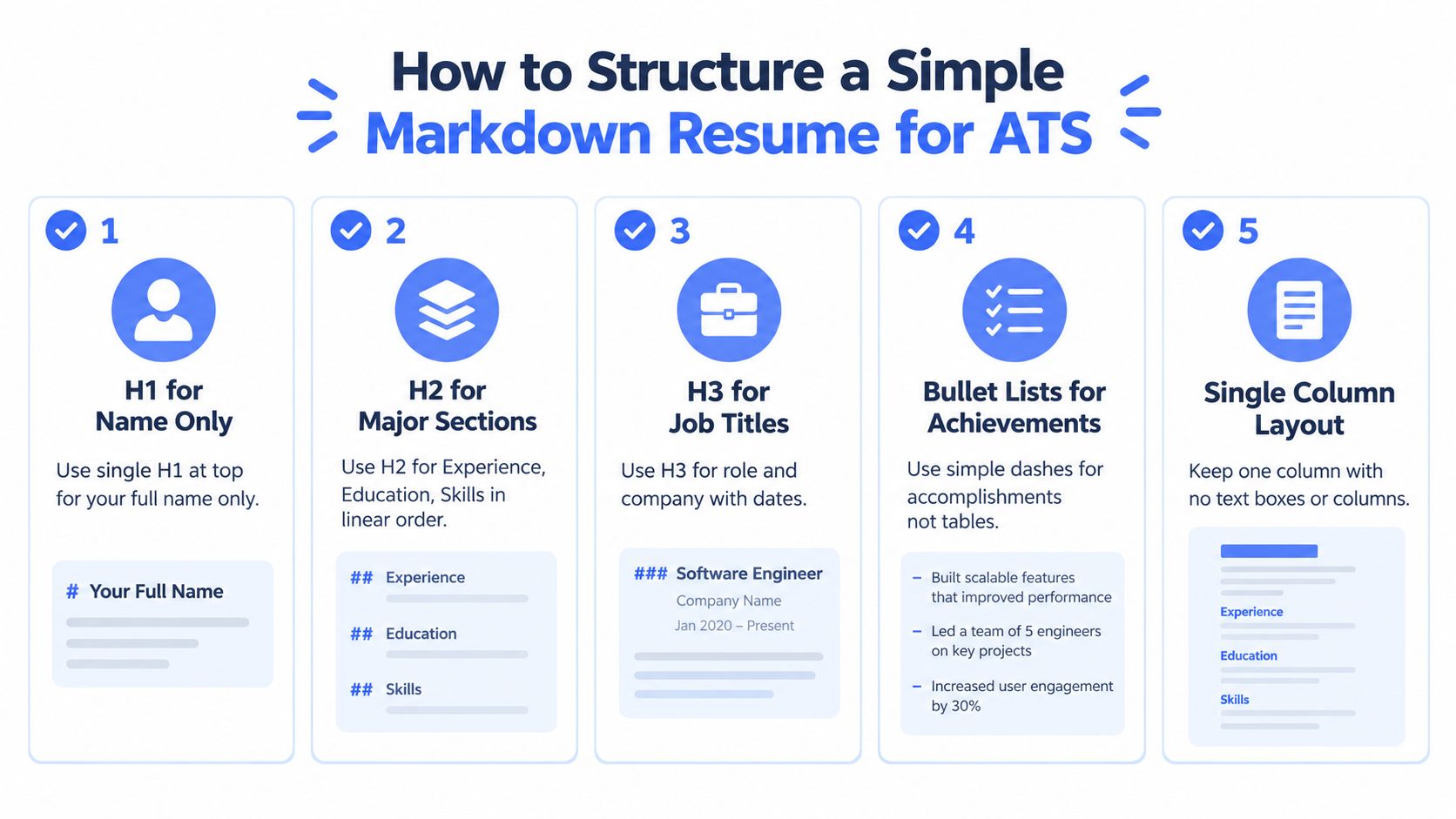
Use one H1 for your full name. Put the name at the top, followed by location, email, phone, LinkedIn, GitHub, or portfolio links as plain text. Avoid placing contact details in a header, footer, image, or decorative box.
-
Use H2 headings for major sections. Choose literal labels such as
Experience,Education,Skills, andProjects. ATS parsers depend on predictable reading order and recognizable section names, so creative labels such asWhat I Buildcan create unnecessary ambiguity. -
Use H3 headings for each role. Include the job title, company, location, and dates in a consistent order. Keep experience reverse chronological, and write dates as selectable text rather than embedding them in a graphic.
-
Use bullets for accomplishments. Each bullet should explain an action, the technical scope, and the resulting effect where that information is available. A bullet such as “Built deployment automation with GitHub Actions and Terraform, reducing manual release work” gives both a human and a parser useful information without requiring a visual diagram.
-
Keep the layout single-column. Don't use Markdown tables to imitate columns. Avoid text boxes, sidebars, floating elements, and multi-column exports. Markdown Resume's structural guide recommends plain text first, real heading levels, and minimal formatting because parsers read the document's hierarchy more reliably than its visual styling.
Formatting that helps without adding noise
Bold text can mark an employer, role, or important scope, but it shouldn't carry information that appears nowhere else. Inline code can make technical keywords visually distinct in Markdown, though the exported document should still expose those terms as ordinary selectable text. Links should use descriptive labels, such as GitHub, rather than long raw URLs scattered through the page.
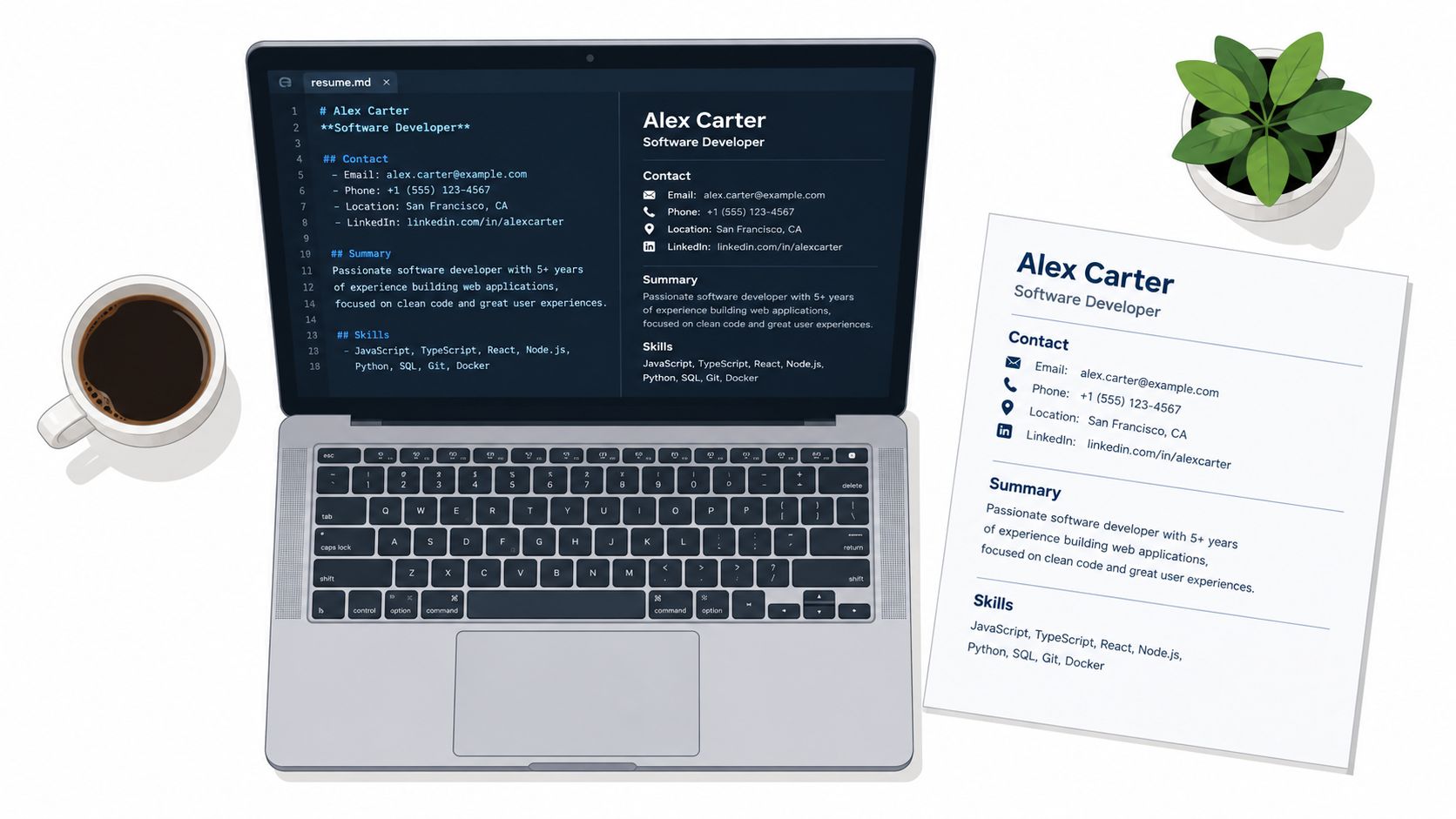
A clean source might look like this:
# Jordan Lee

Berlin, Germany | jordan.lee@example.com | +49 000 000000
LinkedIn | GitHub

## Experience

### Platform Engineer, Northstar Systems
Berlin, Germany | 2022 to Present

- Built deployment workflows with `Terraform`, Kubernetes, and GitHub Actions.
- Improved service observability with Prometheus and Grafana dashboards.
The source remains readable in a repository, browser editor, or version-controlled folder. Its order is explicit. A parser encounters the name, contact details, section heading, role, dates, and bullets in sequence.
Keep the source plain until the content is correct. Styling too early encourages layout compromises, such as shortening useful bullets to fit a narrow column or hiding links in icons. The structure should survive even when the visual theme changes.
Complete Simple Markdown Resume Template You Can Copy
The following example is a complete Markdown resume for a software developer. The names and details are sample content, so replace them with accurate information. Its purpose is to demonstrate a readable order, consistent dates, grouped skills, technical projects, and accomplishment-focused bullets.
# Maya Chen

Toronto, Canada | maya.chen@example.com | +1 000 000 0000
LinkedIn | GitHub | Portfolio

## Summary

Software developer focused on backend services, data workflows, and reliable delivery systems. Experienced with Python, TypeScript, PostgreSQL, Docker, Kubernetes, and cloud deployment. Comfortable translating operational problems into maintainable software and clear engineering practices.

## Experience

### Senior Software Developer, Northstar Analytics
Toronto, Canada | 2022 to Present

- Designed Python services for data ingestion, validation, and scheduled processing.
- Reworked PostgreSQL queries and indexing strategy for reporting workflows with large datasets.
- Built deployment automation with Docker, Kubernetes, and GitHub Actions.
- Added service health checks, structured logging, and operational dashboards for production support.
- Partnered with analysts and product managers to define data contracts and reduce ambiguous requirements.
- Reviewed pull requests, documented service ownership, and supported engineers during production incidents.

### Software Developer, Cedar Labs
Toronto, Canada | 2019 to 2022

- Developed TypeScript APIs for customer reporting and account administration.
- Replaced manual data preparation with repeatable Python jobs and validation rules.
- Created automated tests for API behavior, database access, and failure handling.
- Maintained CI workflows and improved release documentation for the engineering team.
- Investigated defects across application code, SQL queries, and deployment configuration.

## Projects

### Event Pipeline Monitor
GitHub

- Built a monitoring service with Python, FastAPI, PostgreSQL, and Docker.
- Added configurable checks for delayed jobs, failed tasks, and missing records.
- Documented local setup, environment variables, test commands, and deployment notes.

### Infrastructure Change Log
GitHub

- Created a TypeScript service that records infrastructure changes and exposes searchable history.
- Added role-based access controls and structured audit events.
- Published an example deployment using Terraform and Kubernetes manifests.

## Skills

- **Languages:** Python, TypeScript, SQL, Bash
- **Backend:** FastAPI, Node.js, REST APIs, background jobs
- **Data:** PostgreSQL, Redis, data validation, query optimization
- **Infrastructure:** Docker, Kubernetes, Terraform, GitHub Actions
- **Observability:** Prometheus, Grafana, structured logging
- **Practices:** Automated testing, code review, incident response, technical documentation

## Education

### Bachelor of Computer Science, University of Toronto
Toronto, Canada | 2015 to 2019
The header gives contact and identity information without relying on icons. The summary names the target direction and technical areas in plain language. Experience carries the main evidence, while Projects gives recruiters a way to inspect implementation details.
What to customize first
Replace generic bullets with work that can be verified from the employment history. Add a metric only when it reflects a real result you can explain. Don't insert a number because quantified bullets are fashionable.
Tailor the Summary, the order of Skills, and the most relevant Projects for each role. Keep the underlying structure unchanged. That separation lets a recruiter scan quickly and lets an ATS locate familiar terms without forcing a visual redesign.
Build and Export Your Resume in Resumey.Pro Without Reformatting
A Markdown source becomes useful when the editing and export process preserves its structure. In Resumey.Pro, paste existing Markdown into the browser editor or import resume content for conversion into clean, structured Markdown. The editor renders changes as you work, and optional slash commands provide quick formatting without requiring manual layout work.
Keep the content and presentation separate:
- Write or import the source. Confirm that headings, bullets, links, dates, and section order are correct before choosing a theme.
- Check the rendered hierarchy. Look for missing bullets, broken links, unexpected line breaks, or headings that appear at the wrong level.
- Switch templates rather than rebuilding. ATS-oriented options include Altair, Vega, and Orion, alongside other templates in the library. Changing the design should leave the underlying content intact.
- Clone before tailoring. Create a version for backend roles, another for DevOps, or a focused copy for data engineering. Edit the summary, skills, and selected projects in the clone instead of damaging the base resume.
- Export and inspect the PDF. The paid export produces a selectable text-based PDF. Copy text from the result before attaching it to an application.
Editing is available on the Free plan, while Pro passes provide downloads, premium themes, and related features for a defined period without auto-renewal. Pro also includes automatic backups every 5 minutes, according to the publisher's plan details. Multilingual support matters when the same candidate maintains versions for different markets or writing systems.
The practical advantage is the content pipeline. A source file can stay concise and technical, while the template handles spacing, typography, and page presentation. That reduces the temptation to use tables or floating elements just to make the page fit.
Export quality still needs verification. A theme can be ATS-oriented, but the final file is what an employer receives. Treat the PDF as a build artifact, not as proof that the source survived unchanged.
Troubleshooting Export and Parsing Issues Before You Apply
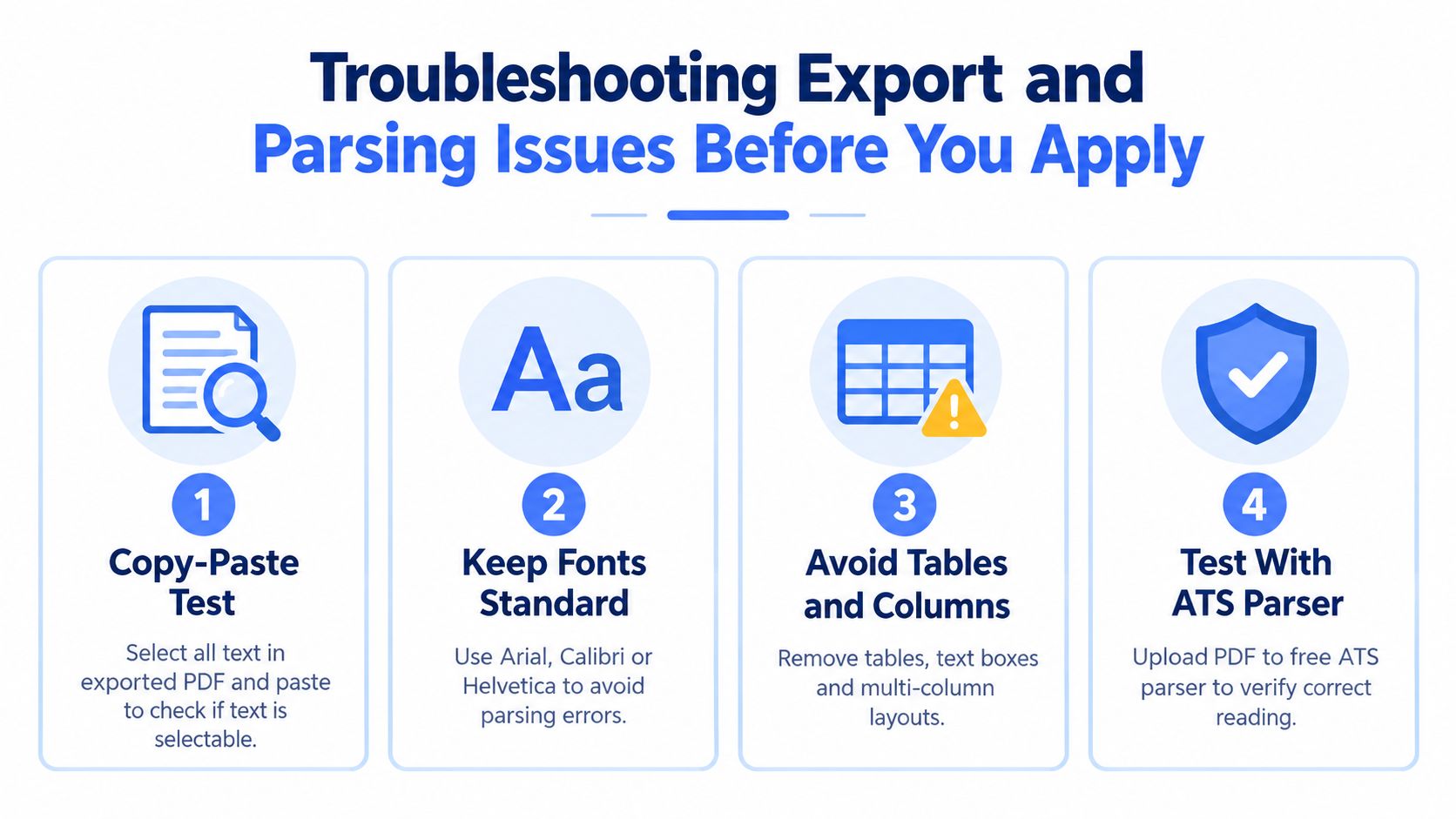
PDF export is where a clean Markdown source can still fail. A PDF may look perfect and contain text that copies in the wrong order, missing characters, or inaccessible content. The reliable check is mechanical: open the file, select the visible text, copy it, and paste it into a plain-text editor. The pasted result should follow the same order as the page.
Independent resume testing reported that clean text-based PDFs parsed correctly about 87% of the time, while complex design PDFs with graphics fell to 64%. The same source reported 19% character-recognition errors with non-standard fonts, and a large ATS audit found 79.8% of PDFs had at least one major or critical issue, while only 5.8% had none. These figures describe tested PDF behavior, not a guarantee for any individual export.
Fix the common breakpoints
- Broken text extraction: Export again with standard fonts and remove graphics, icons, and unusual glyphs.
- Wrong reading order: Remove tables, columns, and sidebars. Return to one linear content flow.
- Missing sections: Use literal headings such as
Work Experience,Education, andSkills. Don't rely on color, size, or position to identify a section. - Image-based output: Regenerate the file as selectable text. Portland Community College guidance says not to scan and send a resume as an image, and recommends standard fonts and typical sizes such as 10, 12, or 14 points, as summarized in this ATS font guidance.
A parser test can provide another signal before submission. For background on how these systems extract fields from documents, review this explanation of AI resume parser software. Use testing to find structural defects, not to chase an arbitrary score.
Copy the PDF into a plain-text editor before applying. If the order is wrong there, the ATS may receive the same broken sequence.
A final pre-send check should cover the name, contact details, dates, employers, headings, links, and technical keywords. Confirm that the exported file opens on another device, that links point to the intended destinations, and that the filename identifies the candidate and role without unnecessary punctuation.
Simple Markdown Resume FAQ
Is Markdown itself readable by an ATS?
Markdown is a source format, not usually the file uploaded to an employer. It becomes useful when exported to a clean, selectable document whose headings, bullets, links, and text remain intact.
Can technical project links appear in a simple resume?
Yes. Use descriptive text links and keep the project name, purpose, and technologies in ordinary text. Avoid replacing the project details with a GitHub icon or an image.
When should I clone a resume version?
Clone when the target role changes the evidence that deserves emphasis. A platform engineering version may foreground infrastructure and reliability, while a data role may lead with pipelines, SQL, and validation work.
Should I submit Markdown, DOCX, or PDF?
Follow the application's requested format. When PDF is accepted, use a selectable text-based export and run the copy-paste test. For systems that explicitly request DOCX, provide a plain, single-column document with standard headings.
Do I need a designed template?
No. A template can improve spacing and consistency, but it shouldn't introduce tables, text boxes, columns, or graphics that interfere with extraction. Choose presentation only after the content structure is stable.
Resumey.Pro lets you write and import structured Markdown, clone resumes for different technical roles, switch among ATS-oriented templates, and export selectable PDFs without rebuilding the document by hand. Visit Resumey.Pro, paste in the template, create a role-specific clone, and run the copy-paste check on the exported file before applying.