
The popular advice says a Markdown resume becomes safe for AI parsing as soon as the source file is clean. That's only half true. The failure point is the export and rendering layer, where a well-structured document can become scrambled text, missing contact details, or glued-together columns. A markdown resume for AI parsing trades visual freedom for dependable reading order, and that trade-off is worth making for developers and technical job seekers who need their experience, skills, and links extracted correctly. By the end, you'll have a copy-ready structure, practical formatting rules, role-specific variant guidance, and an end-to-end PDF validation workflow.
Why Structure Beats Design for AI Parsing
A resume parser doesn't experience a page the way a person does. It extracts text, identifies patterns, and classifies content into fields such as name, contact information, work experience, education, and skills. Section headings and reading order therefore carry more weight than decorative typography or a carefully balanced visual grid. Guidance on Markdown resume structure and ATS extraction describes this plain-text classification process directly.
That changes the design decision. A polished two-column resume may look efficient because skills sit beside experience, but a parser can read the right column before the left, merge unrelated lines, or treat a sidebar as a separate block with no clear relationship to the candidate. A Markdown file naturally encourages a top-to-bottom document flow, provided the renderer preserves that flow when it creates the PDF.
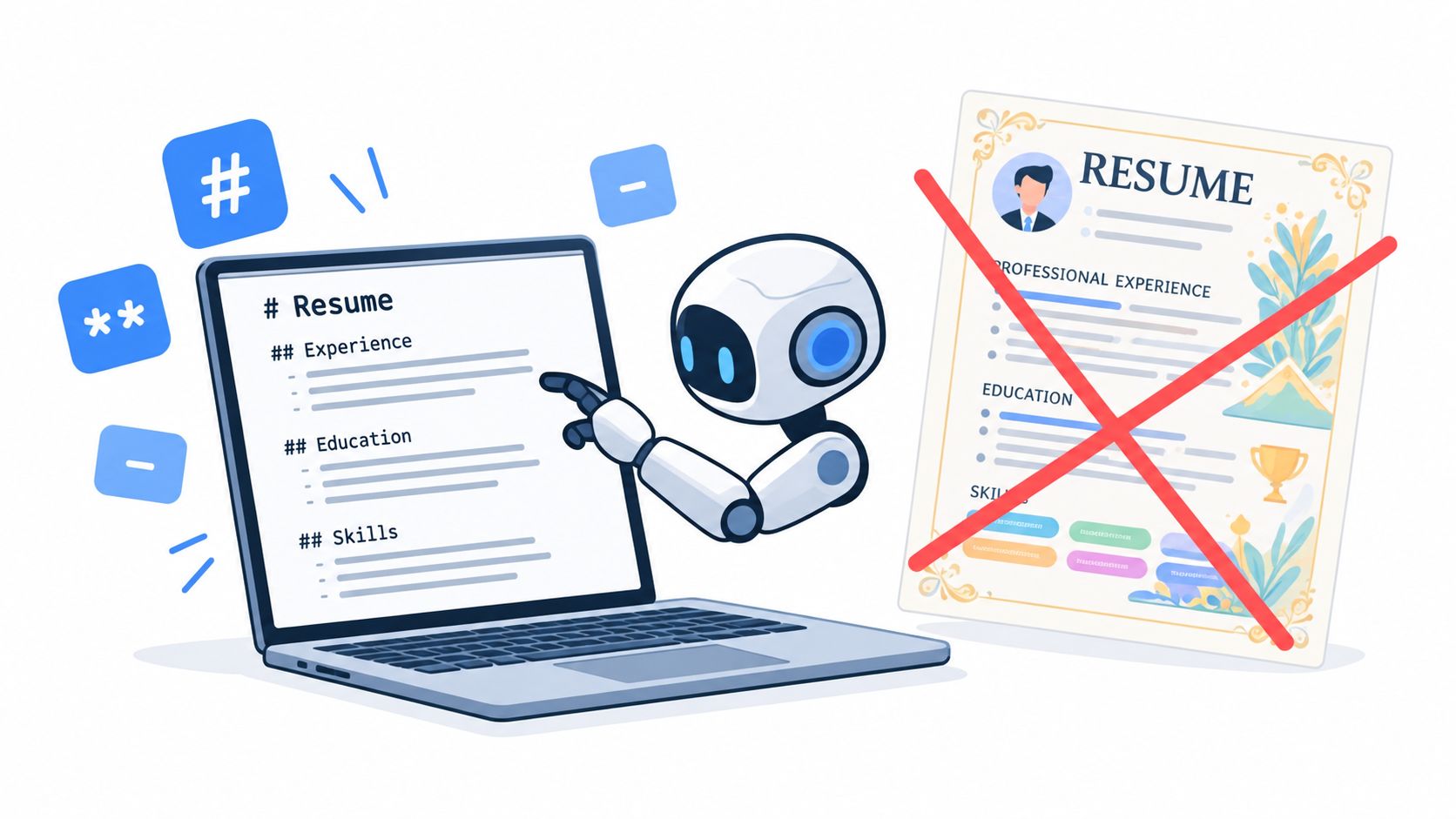
The cost is plain: you give up some visual flair. You'll use fewer ornamental elements, avoid dense sidebars, and accept that a resume optimized for extraction may look less like a designed portfolio. That's a real sacrifice. A human reader can understand a visual relationship between two blocks, while a machine usually needs explicit labels and predictable sequence.
The data supports taking that sacrifice seriously. A 2026 ATS report analyzing 6,852 real documents found that 82.2% had at least one detected issue, with a skills table flattened into glued text as the most common failure, affecting 42.7% of the sample. The report is especially relevant to Markdown workflows because plain-text sections avoid the layout artifacts that can turn a skills list into unreadable output. See the 2026 ATS data report for the methodology and findings.
A separate study of 2,417 anonymized scans reported formatting issues in 62% of submitted resumes, and said enterprise ATS platforms failed to parse nearly one in four resumes correctly. It also associated two-column layouts with a 31% parsing failure rate, reinforcing the practical value of a single-column, text-first structure. Those figures don't mean every styled resume fails. They show why layout-heavy designs create avoidable machine-reading risk. The full findings are available in the 2026 ATS resume study.
The source file is only one part of the system
A Markdown resume can be semantically perfect and still break after conversion. PDF renderers may alter text order, embed fonts badly, drop links, or place content into structures that a downstream parser handles poorly. The visible page can look correct while copied text reveals missing or rearranged information.
That's why a practical Markdown workflow treats the resume as a pipeline:
- Write semantic Markdown with standard headings and linear content.
- Render it to PDF using a predictable template.
- Extract the PDF as plain text and inspect the result.
- Test the exported file in more than one viewer or parser.
- Fix the renderer or source, rather than assuming the visual page proves anything.
This approach aligns with the distinction explained in why Markdown can beat Word for resumes. The benefit comes from separating content from presentation, but that separation only helps when the presentation layer retains the content's order and visibility.
A useful reference for comparing practical Markdown-first workflows is the We Are Distributed resume builder. The important principle isn't the specific editor. It's the ability to keep structured content independent from styling and then inspect the generated document.
AI systems add another layer. Some tools ingest Markdown directly, while others convert PDFs or DOCX files into Markdown before sending the text to a model. In both cases, consistent terminology, explicit section labels, and clean hierarchy help extraction more than visual polish. By choosing structure first, you're accepting a narrower design range so the same resume can survive ATS extraction and AI ingestion.
How to Structure Headings and Sections So AI Reads Them Correctly
Treat heading levels as data, not decoration. A parser uses them as signals for boundaries, relationships, and document hierarchy. A single clear name heading followed by conventional section labels gives the extraction system a much simpler map.
Use a predictable hierarchy
Use this order:
# Full Name- Contact block
- Short professional summary
## Experience## Education## Skills- Optional sections such as Certifications, Projects, or Languages
Use H3 headings for individual roles or entries beneath a major section. Keep the role title and organization close together, and make the dates and location plain text on the next line.
Here's a compact skeleton:
# Alex Morgan

alex.morgan@example.com | +1 555 010 2040 | Austin, TX
 |

## Summary

Backend engineer specializing in Python, distributed systems, and cloud infrastructure.

## Experience

### Senior Backend Engineer, Northstar Labs

Austin, TX | March 2022 - Present

- Built Python services for event-driven data processing.
- Improved deployment reliability through Docker and Kubernetes automation.

### Software Engineer, River Systems

Remote | June 2019 - February 2022

- Developed Go APIs and PostgreSQL data pipelines.
- Added automated testing across core service repositories.

## Education

### BSc Computer Science, State University

Austin, TX | 2015 - 2019

## Skills

Python, Go, PostgreSQL, Docker, Kubernetes, AWS, REST APIs, automated testing
The labels matter. ## Experience is easier to classify than ## Where I’ve Made an Impact. A creative heading may sound more distinctive to a person, but it gives the parser a weaker field name. Standard terms also improve consistency across role-specific copies.
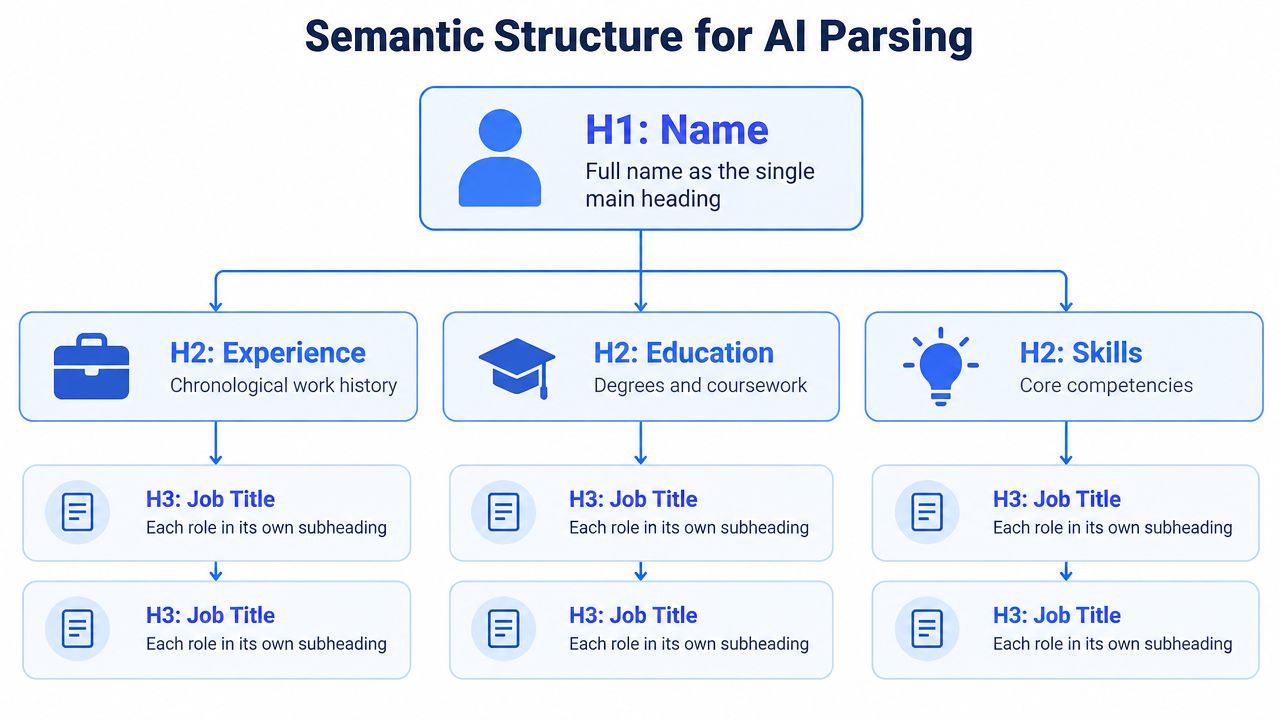
Place contact details immediately below the name. Keep the summary short and factual, then move into experience before education and skills unless a different order reflects the target role. For a recent graduate, education can move above experience, but the heading should remain explicit.
The structure also helps AI models extract entities. A role title, employer, date range, technology, and accomplishment appear in a stable relationship. That's more useful than placing the same details in a visually clever header, sidebar, or graphic.
A broader discussion of structured content for AI systems appears in this guide to optimizing content for AI chatbots. Resume parsing has its own constraints, but the shared lesson is clear: models work with identifiable structure, not visual intention.
Formatting Dates Locations Bullets and Links for Reliable Extraction
Clean Markdown helps, but it does not guarantee reliable extraction. The renderer and PDF export can reorder text, drop link destinations, or separate dates from the roles they describe. Write each entry as a linear block, then check the exported result in more than one viewer and in the target ATS.
Dates and locations
Use a complete month and year when possible. Keep the date range on one line, separated from the location with a vertical bar or simple comma.
Bad:
| 2022 | Current | Austin |
Better:
Austin, TX | March 2022 - Present
Avoid right-aligned date columns, table cells, and floating text boxes. Their visual alignment may disappear during PDF extraction, leaving the parser unsure which date belongs to which employer. A plain text copy of the exported PDF should preserve the same relationship.
Role lines and bullets
Bold text works when it follows the source's linear reading order. Use it to emphasize a title or company, not as a substitute for headings.
### **Senior Backend Engineer**, **Northstar Labs**

Austin, TX | March 2022 - Present

- Built Python services for event-driven data processing.
- Reduced manual deployment work by creating Docker and Kubernetes workflows.
Use ordinary Markdown bullets. Avoid custom symbols, icon fonts, and manually spaced lines. Start each bullet with a clear action, then name the technology or business context when it helps identify the accomplishment.
Links and skills
For a portfolio or GitHub profile, include the visible URL. A display label may help human readers, but the destination should remain in the text so it survives conversion when link metadata disappears.
GitHub:
Portfolio:
List skills as comma-separated text or simple bullets. Tables can flatten into glued text during extraction, so the same rule applies to contact blocks. Do not use an icon as the only representation of an email address, phone number, or location.
| Formatting Choice | Parsing Outcome |
|---|---|
| Single-column Markdown flow | Preserves a predictable reading order |
| Standard H2 section labels | Gives classifiers recognizable field boundaries |
| Full month and year dates | Keeps role timelines easier to associate |
| Plain Markdown bullets | Extracts accomplishments as separate lines |
| Visible URLs | Retains destinations when link metadata is lost |
| Skills in plain text | Avoids table-cell flattening |
| Inline HTML and decorative layout | Adds renderer-specific failure points |
The Markdown resume guidance for links and images explains how online references can disappear during export. Keep links useful for readers, while ensuring the resume still contains the relevant destination as visible text. After exporting, open the PDF in different viewers and copy its text. If the copied sequence changes, fix the renderer or layout before submitting.
Parsing Pitfalls to Avoid in Markdown Resumes
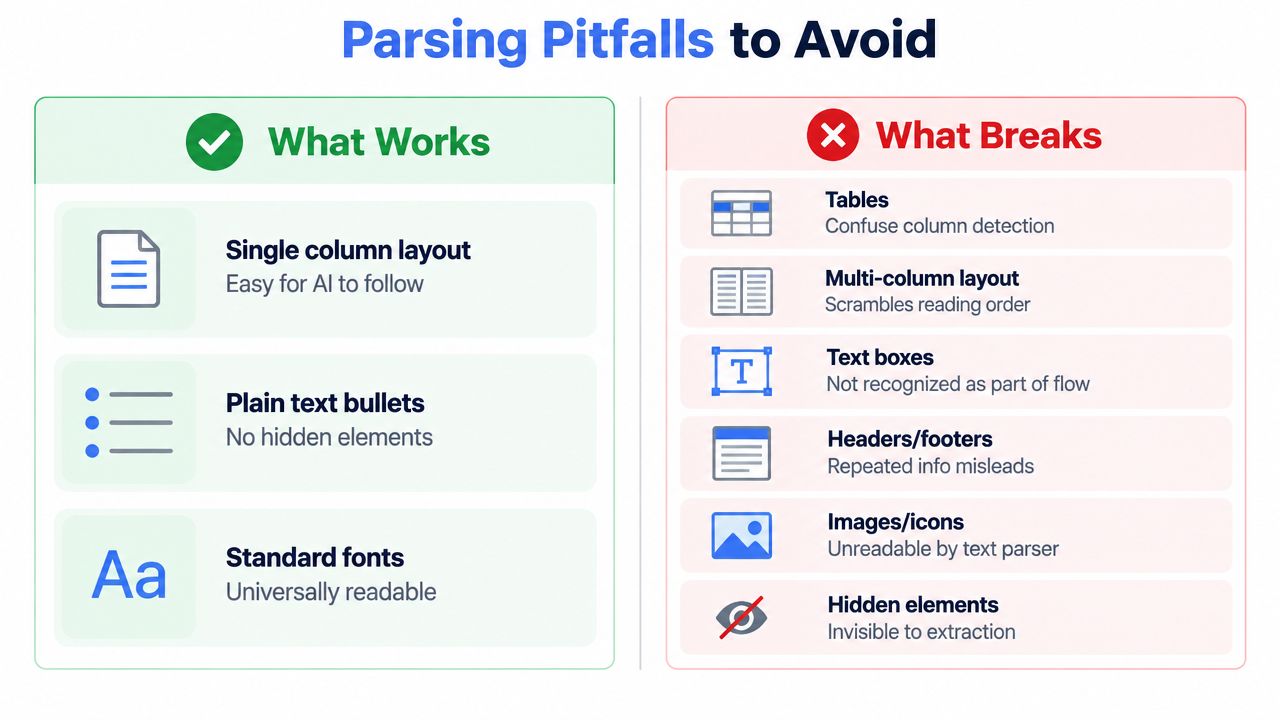
A clean source file doesn't make every feature safe. Markdown can produce tables, columns, inline HTML, and styled blocks, especially when a renderer supports extensions beyond basic Markdown. Each added layout feature creates another opportunity for the PDF layer to change the text sequence.
The clearest failure pattern is a table. In the 2026 ATS data report, a skills table flattened into glued text affected 42.7% of the 6,852-document sample. That doesn't make every table unusable, but it shows the mechanism plainly. Separate cells can collapse into one string, while the parser loses the intended grouping between a skill category and its contents.
What breaks and why
- Tables: Cell order can collapse, especially when skills or dates are distributed across columns. Replace them with headings and plain lists.
- Multi-column layouts: Extraction may follow geometric coordinates rather than intended reading order. Use one vertical stream.
- Text boxes: Content can sit outside the document's normal text flow. Place the same information in ordinary paragraphs.
- Headers and footers: Repeated contact details may be inserted between unrelated lines or omitted entirely. Keep essential identity data in the main body.
- Images and icons: A parser may see no meaningful text in a visual symbol. Write
Email:,Phone:, andLocation:explicitly. - Hidden elements: White text, collapsed blocks, and accessibility-hidden content can vanish from extraction. Remove anything that isn't meant to be visibly read.
A separate benchmark of 181 resumes found 42% showed multi-column or table artifacts in extracted text and 43.6% were flagged for section-detection problems. It also reported that 18.2% failed to produce a usable candidate record because identity or core sections couldn't be extracted reliably. The ATS resume parsing benchmark also identified missing extractable names, emails, and phone numbers as separate failure conditions.
The fix is usually boring and effective: one column, ordinary text, standard headings, and no essential detail trapped in a visual element. Don't assume a browser preview proves anything. A renderer can preserve the appearance while changing the underlying text order.
A PDF is an output format, not evidence that the source survived intact.
Run a text extraction check before applying. If the first lines contain your name and contact details, each experience entry stays together, and the skills section remains readable, the file has passed a meaningful test. If the output looks like a shuffled list, return to the Markdown or change the renderer.
Using YAML Frontmatter and Role Specific Variants Without Breaking Parsing
YAML frontmatter can help when a tool reads Markdown directly or uses it as an intermediate format. Keep it small, valid, and separate from the visible resume body.
---
name: Alex Morgan
email: alex.morgan@example.com
phone: "+1 555 010 2040"
location: Austin, TX
keywords:
  - Python
  - Kubernetes
  - PostgreSQL

---
The visible document still needs the same information below the frontmatter. Some ATS pipelines ignore YAML entirely, while others may treat it as metadata rather than resume content. Duplication is safer than assuming every system understands the frontmatter block, but the visible version should remain the canonical presentation.
Keep variants semantically aligned
Role-specific tailoring should change emphasis, not create conflicting terminology. A backend version can prioritize Python, APIs, and distributed systems, while a DevOps version can foreground Kubernetes, infrastructure automation, and observability. Keep employer names, dates, job titles, and core technology names identical across versions unless there's a factual reason to change them.
Bold labels can improve human scanning and may help models identify nearby entities when the formatting survives ingestion. They're secondary to exact language. PostgreSQL should remain PostgreSQL, rather than alternating with loosely related phrases such as SQL database work in another copy.
Avoid relying on slash commands, custom Markdown extensions, or rich styling as semantic signals. They may work inside a particular editor and disappear during conversion. Use them as authoring shortcuts only, then inspect the rendered result.
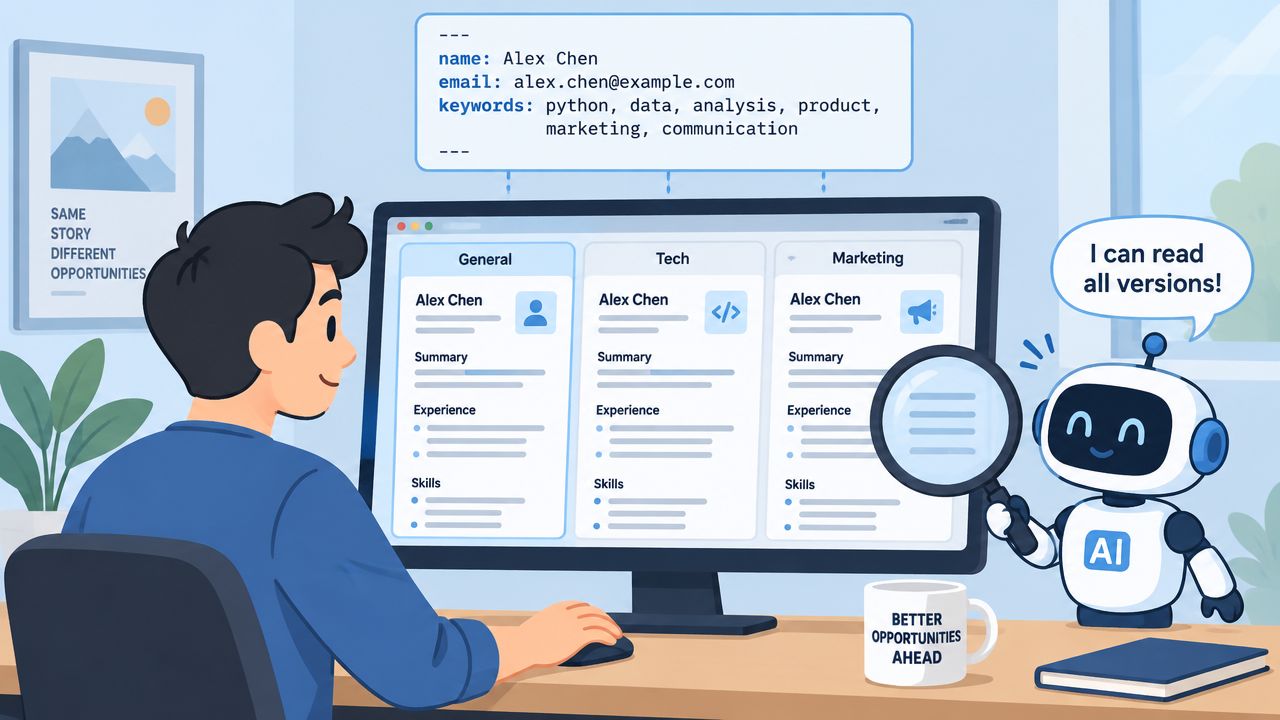
A Markdown-first builder such as Resumey.Pro supports cloning versions, switching templates, importing content into structured Markdown, and rendering multilingual documents. Those features address the maintenance problem, but they don't remove the need to inspect exported text. Every variant still needs consistent labels and an export check.
Testing Your Markdown Resume and Exporting a Faithful PDF
Clean Markdown does not guarantee clean parsing. The renderer and PDF export can reorder text, drop links, replace symbols, or separate contact details from the surrounding content. Validate the rendered file, not only the source.
Use this sequence for each important version:
- Inspect the first lines. Confirm that the name, email, phone, location, and profile links appear as readable text.
- Check section order. Experience, education, skills, and other sections should remain in the intended sequence.
- Read each role continuously. The title, company, location, dates, and bullets should stay together.
- Search for critical terms. Check exact technologies, certifications, languages, and job titles.
- Run a parser test. Use an ATS parser and review the extracted candidate record, not only a visual score.
- Repeat across environments. Open the file on different operating systems, with different viewers, and with the fonts used by the template.
Test global applications with extra care. Right-to-left scripts, non-Latin characters, and multilingual contact details can change direction or disappear during export. Select visible URLs and confirm that their destinations remain attached. A link that looks clickable but loses its destination fails for both machines and people.
DOCX and PDF support varies by system. One independent source states that DOCX is accepted by 100% of ATS systems and PDF by 96%, while warning that tables, graphics, or images can lose 50% or more of their content during parsing. Review the source structure and PDF considerations for Markdown resumes before choosing an export path. A clean PDF can remain ATS-readable, but its underlying text order controls extraction.
Resumey.Pro provides one-click PDF export intended to preserve layout across operating systems and fonts while avoiding text boxes. The verification process still applies: export, copy the text, inspect it, and run a parser test. Treat every generated PDF as a build artifact requiring an end-to-end check across viewers and ATS tools.
Use Resumey.Pro to keep resume content in structured Markdown, clone versions for technical roles, and switch ATS-friendly templates without rewriting the source. Visit Resumey.Pro to create a version, export it to PDF, and verify the complete parsing pipeline.